Got a few minutes to kill? Maybe you're stuck waiting for something, or you just want a quick break from your day. Either way, a fast racing game is a good way to fill that time.
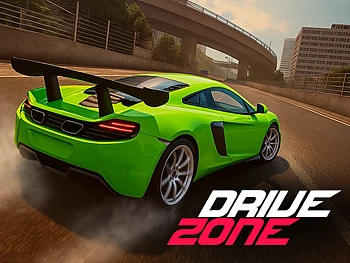
Drive Zone drops you onto city streets, rally tracks, and rough off-road paths. You don't need to install anything or make an account. Just open it in your browser and go. If you like cars, speed, and the challenge of a tricky turn, this one is worth a try. It's simple to pick up, but the different surfaces keep it interesting. Anyone who enjoys a quick race will feel at home here.
📖 Drive Zone Games Overview
Drive Zone is a browser-based racing game where you drive through three very different kinds of terrain. One race might have you speeding down a city street, and the next could throw you onto a rally track or a bumpy off-road trail. Each surface feels different, so you can't drive the same way everywhere. The game is all about speed, but also about control and handling whatever the road gives you.
A round is simple. You pick your car, hit the gas, and race toward the goal while dodging whatever gets in your way. Every turn matters. Go too fast into a corner and you'll lose time. Brake too much and you'll fall behind. You can switch your camera view to see the action from a different angle, which helps on tight sections. There's no multiplayer here, so it's just you against the track. That's part of the charm. You learn the course, fix your mistakes, and try to beat your own run.
🖼️ Drive Zone Games Preview
👥 Who Will Enjoy Racing Games Like Drive Zone?
This game suits people who like quick, casual races without a big commitment. If you enjoy racing games but don't want to spend hours learning complicated controls, you'll fit right in. It's also good for younger players, since the controls are easy to understand. Fans of drifting and car upgrades will find plenty to like too. And if you just want something to play for five minutes on your phone or laptop, it works for that as well. You don't need to be a pro driver. You just need to enjoy going fast.
🎮 Drive Zone Games Controls & How to Play
The controls are about as simple as they get on a computer. Press W to accelerate, and S to brake or reverse. Use A to steer left and D to steer right. That's the whole driving setup. If you want a different view of the road, hit C to switch the camera. And if you need a break mid-race, press Esc to pause. Nothing complicated there.
On mobile, you use on-screen controls instead of a keyboard. The layout is landscape, so hold your phone or tablet sideways for the best view. The buttons sit on the screen, and you tap them to drive. It takes a minute to get used to touch controls if you normally play with a keyboard, but it's not hard. First, get a feel for steering. Next, practice braking before corners. Then you'll be racing smoothly in no time.
Drive Zone Games in Detail
Moment to moment, the game is about reading the road and reacting fast. On a city street, the surface is smooth, so you can push your speed. Then the track changes to rally ground, and suddenly the car slides more. Off-road is rougher still, with bumps that test your steering. You'll feel the difference right away. The engine power matters, but so does knowing when to ease off the gas.
Drifting is a big part of the fun. When you take a corner too fast, the back of the car swings out, and you have to correct it. Some players fight the drift. Better players use it to carry speed through the turn. You'll also run into upgrades as you play, which let you improve your car over time. A faster car helps, but it won't save you from bad driving. The camera switch is handy here too. A different angle can show you a corner you didn't see coming. So the game rewards practice, not just raw speed.
✨ Drive Zone Games Key Features
- Race across city streets, rally tracks, and off-road terrain
- Simple keyboard controls on desktop and on-screen controls on mobile
- Camera switch to change your view during a race
- Car upgrades to improve your ride over time
- Drifting mechanics that reward good cornering
⚙️ Drive Zone Games Specifications
| Game Title | Drive Zone |
|---|---|
| Genre / Category | Racing |
| Developer | FPDA |
| Platform Support | Desktop (Windows/Mac), Mobile (iOS & Android) |
| Technology | HTML5 / WebGL Canvas |
| Controls | Keyboard, Mouse & Touchscreen |
💡 Drive Zone Games Tips & Strategy Guide
First, learn to brake before a corner, not during it. If you wait until you're already turning, you'll slide wide and lose speed. Next, use the camera switch on tracks you don't know well. A different angle can show you what's coming, so you won't get surprised by a sharp turn. On off-road sections, slow down a little. The rough ground makes your car harder to control, and speed won't help you there. When you drift, don't panic. Steer into the slide gently instead of fighting it. Also, spend your upgrades wisely. A better car makes a real difference on the faster tracks. Finally, practice the same course more than once. You'll remember where the tricky parts are, and your times will drop.
If you enjoy Drive Zone, you may also like Car to the sky Racing Game – 3D Free Online and Car Driving In big City 2 Racing Game – Play Free – both free to play right in your browser.
Why Players Enjoy Drive Zone Games
There's something satisfying about a race you can start in seconds. Drive Zone is free to play online in your browser with no download, so there's no waiting around. You just click and drive. The mix of surfaces keeps things fresh, because you're never doing the same thing for too long. City streets, rally tracks, and off-road trails all ask for a different approach. Add drifting and car upgrades, and there's a reason to come back. It won't take over your life, but it's a fun way to spend a spare ten minutes.
❓ Frequently Asked Questions about Drive Zone Games
Q: Can I play Drive Zone with friends?
A: No. The game doesn't have a multiplayer mode, so you race on your own against the track. That's fine though, because beating your own best time is its own challenge. You can still compare times with friends the old-fashioned way, by telling them what you managed.
Q: What controls do I use on a computer?
A: Use W to accelerate, S to brake or reverse, A and D to steer, and C to switch the camera. Press Esc if you need to pause. That's all you need to remember, so you can start racing right away.
Q: Does Drive Zone work on phones?
A: Yes. On mobile you use on-screen controls, and the game runs in landscape mode. Just turn your phone sideways and tap the buttons to drive. No download is needed, since it plays right in your browser.
About This Game’s Source
This game is embedded from a third-party HTML5 game provider feed and runs in your browser with no download or installation. If it does not load, or anything about it seems inappropriate, please use the Report button above so the Gply team can review it and remove it if needed.
🎯 More Games Like Drive Zone
Enjoying this game? Play more Racing games free online.

admin is part of the Gply team. Every game on this page was checked to load before it was published. More about us