- Parking Practice Simulator Games Overview
- Parking Practice Simulator Games Controls & How to Play
- Parking Practice Simulator Games Key Features
- Parking Practice Simulator Games Specifications
- Parking Practice Simulator Games Tips & Strategy Guide
- Frequently Asked Questions about Parking Practice Simulator Games
You ease the car toward a narrow space, turn the wheel, and check how much room is left. One small mistake can bring a parking sensor beep, so you need to watch your path and take your time. That’s the simple challenge at the heart of this driving game.
Parking Practice Simulator is a good pick if you like cars but want more than racing around a track. It asks you to park with care, using guide lines and sensor sounds to judge each move. You can try different parking tasks, practise without limits, or work through career goals. It suits players who enjoy careful driving and don’t mind trying a tricky manoeuvre more than once.
📖 Parking Practice Simulator Games Overview
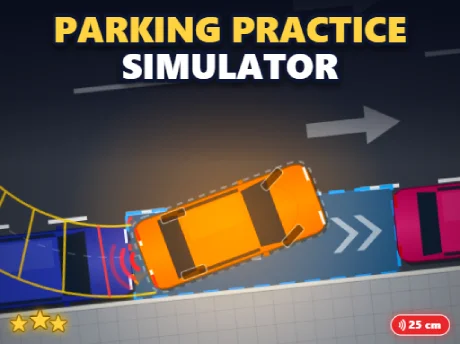
Parking Practice Simulator is a top-down 2D parking game built around car sizes and spaces that follow real measurements. Bays are 2.4 metres wide, while lanes are 3.25 metres wide. The car’s wheelbase and turning radius also follow true-to-scale measurements, so the space you have to work with matters. You steer by turning the wheel, and it takes three turns to move from full lock in one direction to full lock in the other.
Each level gives you a parking task to complete. You might need to park parallel to the road, reverse into a straight or angled bay, or handle a space in a multi-storey car park or tight garage. There are 15 levels, including a night challenge. Guide lines show the car’s planned path, and the parking sensors beep faster as you get closer to cars, walls, and pillars. In Career, you unlock levels, try to beat target times, and collect stars. Training lets you practise any level or parking type without limits. You can pick a small car, an estate, or an SUV, then play on a PC or mobile device. The screen is set up in landscape, so you’ll play with it held or turned sideways.
🖼️ Parking Practice Simulator Games Preview
👥 Who Will Enjoy Racing Games Like Parking Practice Simulator?
Racing games often focus on speed, but this one is about control and careful moves. It’s a good fit for players who like cars, parking puzzles, and learning how steering changes a car’s path. If you enjoy taking a tricky task one step at a time, you’ll likely find the slow, measured pace satisfying. It can also suit players who want a break from fast races and prefer a clear goal in each level. The Training mode is handy if you want to practise without limits, while Career gives you target times and stars to aim for. Just be ready to make small adjustments.
🎮 Parking Practice Simulator Games Controls & How to Play
Use the WASD keys, mouse, or touch controls to control the car. Hold Drive or Reverse to move, and use the steering wheel to turn. The wheel takes three turns to go from one full lock to the other, so give yourself room to line up before moving into a bay. Press Space to brake, and tap C to center the steering. If a parking attempt goes wrong, R restarts the level. Esc pauses the game.
The extra keys can help you check your position. Use + and – to zoom, F for an overview, and G to show or hide the guide lines. First, look at the space and the car’s path. Then move into position, keeping an eye on the guide and listening for the sensors. If the beeps get faster, you’re getting closer to another car, a wall, or a pillar.
Parking Practice Simulator Games in Detail
A parking attempt is all about judging where the car will go before you move. The guide lines give you a view of its path as you steer, which helps you see how turning affects your position. You can use that to line up with a bay or make room for a reverse. The car’s turning radius and wheelbase are based on real measurements, so a tight turn needs thought. It’s less about rushing and more about noticing what each small move does.
The sensors give you another clue as you work through a level. Their beeps speed up when you get closer to nearby cars, walls, or pillars, so listen while you steer and move forward or backward. The tasks cover parallel parking, reverse parking in straight and angled bays, a multi-storey car park, and a tight garage. There’s also a night challenge. You can try to beat target times and earn stars in Career, or switch to Training to practise any level or parking type without limits. Choosing between a small car, an estate, and an SUV also changes the car you’re steering, so check your space and guide lines as you line up.
✨ Parking Practice Simulator Games Key Features
- Top-down 2D parking with true-to-scale car and space measurements
- 15 levels, including parallel, angled, and reverse parking tasks
- Parking sensors that beep faster as you get closer to objects
- Career goals with level unlocks, target times, and stars
- Training mode and a choice of small car, estate, or SUV
⚙️ Parking Practice Simulator Games Specifications
| Game Title | Parking Practice Simulator |
|---|---|
| Genre / Category | Racing |
| Developer | Vrealmatic |
| Platform Support | Desktop (Windows/Mac), Mobile (iOS & Android) |
| Technology | HTML5 / WebGL Canvas |
| Controls | Keyboard, Mouse & Touchscreen |
💡 Parking Practice Simulator Games Tips & Strategy Guide
Take a moment to check the bay before you move. The guide lines show where the car will go, so use them to plan your turn instead of guessing. If the space looks tight, make small moves and check the line again before driving or reversing further. Listen to the parking sensors, too. Faster beeps mean you’re closer to a car, wall, or pillar, so stop and adjust your position. The wheel takes three turns from lock to lock, which makes it worth keeping track of how far you’ve turned. If you lose your place, use the overview or zoom controls to check the scene. You can also use C to center the steering before trying again. Training mode is a useful place to practise a parking type without limits; save Career for working toward its target times and stars.
If you enjoy Parking Practice Simulator, you may also like Hyperleague Racing Game – 3D Free Online and Skyway Moto Racing Game – 3D Free Online – both free to play right in your browser.
Why Players Enjoy Parking Practice Simulator Games
There’s a nice little puzzle in every parking task: work out how to turn the car into the space without getting too close to anything. Guide lines and sensor beeps give you clear clues, while the true-to-scale measurements make the gaps feel meaningful. You can take your time in Training or give yourself a goal with Career’s target times and stars. I like that the game focuses on small choices rather than speed. Parking Practice Simulator is free to play online in a browser, with no download needed, so you can get straight to the parking challenge.
❓ Frequently Asked Questions about Parking Practice Simulator Games
Q: How many levels does Parking Practice Simulator have?
A: It has 15 levels, including a night challenge.
Q: Can I practise without time limits?
A: Yes. Training mode lets you practise any level or parking type without limits.
Q: Can I play on a mobile device?
A: Yes. The game supports mobile play with touch controls.
About This Game’s Source
This game is embedded from a third-party HTML5 game provider feed and runs in your browser with no download or installation. If it does not load, or anything about it seems inappropriate, please use the Report button above so the Gply team can review it and remove it if needed.
🎯 More Games Like Parking Practice Simulator
Enjoying this game? Play more Racing games free online.

admin is part of the Gply team. Every game on this page was checked to load before it was published. More about us